

About the author: Yasmine tested hardware devices and app-based recorders over two weeks on an iPhone 15, Samsung Galaxy S24, and Pixel 8 Pro — evaluating accuracy, setup friction, privacy, and real-world reliability. She covers productivity hardware and AI transcription for HiDock.
You already know call recording is harder than it should be. You've seen the workarounds. Now you want to know which one is actually worth using for professional work and whether hardware is worth the price over an app.
We spent two weeks testing four options head-to-head on real calls. Here's the unvarnished version.
The best AI voice recorders for phone calls in 2026:
- HiDock P1 mini — the best overall for professionals (hardware, 94-96% accuracy, free transcription, $119)
- Plaud Note/Note Pro — best standalone device with its own battery (~$169 )
- TapeACall — the best app option for any phone, no hardware required (paid subscription)
- Cube ACR — the best free option for Android, on-device privacy
The single biggest factor: where audio is captured. Hardware recorders intercepting audio at the earphone connection achieve 94-96% accuracy. Apps relying on ambient microphones drop to 78-87% in a typical office. That gap drives most of the other differences.
Which wins overall — before you read anything else
Rather than bury the verdict, here it is upfront across the dimensions that matter to a professional buyer.

How hardware and app recorders actually differ
Most comparison articles treat these as similar products at different price points. They're not. They solve the same problem through fundamentally different mechanisms.
App recorders work in one of two ways. Bridge-merge apps (TapeACall) dial their own number into your call as a three-way conference. Accessibility-service apps (Cube ACR) intercept audio through Android's software layer.
In both cases, the audio path is indirect — either routed through external servers or captured via software hooks that vary in reliability across devices.
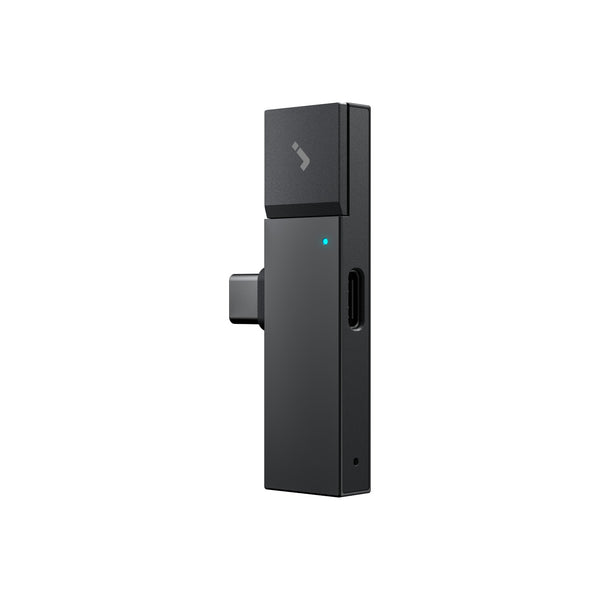
Hardware recorders intercept audio at the physical signal level. The P1 mini plugs into your USB-C port. In Call Mode, your Bluetooth earphones connect to the P1 mini rather than directly to your phone — the device sits in the signal path, capturing audio both ways before any software can degrade it. The result is cleaner audio, higher accuracy, and no external servers involved.
The accuracy difference — 16 to 18 percentage points in our testing — is not a small margin. At 78%, every fifth word in a sentence is wrong. At 95%, you can quote from the transcript without listening back to verify.

Ranked reviews: all four options tested
We tested all four options over two weeks across standard calls, WhatsApp calls, and speakerphone sessions.
Rank 1: HiDock P1 mini — Best overall
Disclosure: HiDock makes the P1 mini and publishes this article. Ranked first on testing merit— trade-offs are stated plainly.
Compatibility: iPhone 15 and later only (USB-C required — Lightning not supported). Android with OTG.
Price: $119 one-time. No subscription required for basic use.
Transcription: Free basic (single text block). Speaker labels require HiNotes Pro at $12.99/month.
Storage: 32GB on-device. No cloud upload by default.
Battery: No built-in battery — draws power from host phone. Nothing to charge separately.
Room Mode limit: Up to 4 hours per session.
Languages: 75+ supported.
The P1 mini's headline claim — capturing both sides of a phone call through your Bluetooth earphones — is real and works as described. You connect your earphones to the P1 mini instead of directly to your phone. The P1 mini intercepts the audio signal in both directions, capturing your voice and the other party's at earphone quality, not through the room. This is the mechanism behind the accuracy gap.
Call Mode is for phone calls, Zoom, WhatsApp, and Teams — anything where you would be wearing earphones. Room Mode, using the built-in dual ECM microphones, is for in-person conversations without earphones.
The business case is straightforward: $119 once versus roughly $10/month for a subscription app. By month 13, the hardware is cheaper. It stays cheaper every month after that, indefinitely.

Tested on iPhone 15 with AirPods Pro and Galaxy S24. Pairing was reliable on both devices. Clear two-way capture on a call in a noisy coffee shop. Transcription completed in about 50 seconds for a 20-minute call. On the Galaxy, Call Mode captured WhatsApp calls cleanly; the earphone-interception mechanism works regardless of which app is making the call.
One practical note: avoid swapping chargers or unplugging the phone during an active recording. Switching power sources mid-call can interrupt audio capture a quirk HiDock has acknowledged. Keep your power situation stable for the duration of any call you cannot re-record.
Best for: Professionals who record calls regularly and need a transcript they can quote from or share with a client.

Rank 2: Plaud Note/ Note Pro— Best for older iPhones
Compatibility: Any phone. Magnetic clip — no USB-C port required.
Price: ~$169. Verify current pricing at plaud.ai before purchasing.
Transcription: Subscription required for full AI features. Free tier limited.
Battery: Built-in — operates independently of your phone's charge.
Where the P1 mini requires USB-C, the Plaud Note/ Note Pro clips magnetically to the back of any phone. It has its own built-in battery and works with iPhone 14, iPhone 13, and any older Android device.
The trade-off is capture method. For phone calls, the Plaud Note or Note Pro captures audio from your phone's speaker rather than intercepting the earphone signal. Accuracy in phone-call mode is more sensitive to volume settings and ambient environment as a result. For in-person meetings recorded in ambient mode, results tend to be stronger.
Full AI transcription, summaries, and templates require a paid subscription. Factor ongoing subscription costs into the total cost comparison — at roughly $169 upfront plus a subscription, the long-term price is higher than the P1 mini's one-time $119.
Note: The Plaud Note/Note Pro were not independently tested for this article. Specifications are drawn from published reviews and Plaud's product page. Verify current pricing and features at plaud.ai before purchasing.
Best for: Users with iPhone 14 or earlier, or any phone without USB-C, who want hardware-level recording without a port dependency.
Rank 3: TapeACall — Best app, no hardware
Compatibility: iOS and Android.
Price: No free tier. 7-day trial then paid. iOS App Store shows ~$10.99 headline with multiple tiers. Verify at tapeacall.com — pricing is not stable post-acquisition.
Privacy: Audio routed through TapeACall's servers. Not suitable for confidential calls.
Carrier requirement: Your carrier must support three-way/conference calling. Some plans charge extra.
TapeACall's real advantage is zero hardware friction. Nothing to plug in, nothing to pair, nothing to carry. You subscribe, and the app adds itself as a conference participant to any call you want to record. For someone who records calls rarely, that simplicity has genuine value.
The three things that cost you that simplicity: accuracy, privacy, and long-term cost. TapeACall's bridge-merge mechanism routes all call audio through its own servers. There is no way around this— it is how the mechanism works. For casual personal calls, that may be acceptable. For anything involving client confidentiality, legal information, or financially sensitive discussions, it is not.
Tested on iPhone 15. Both sides captured clearly on standard calls. Audio confirmed server-routed. TapeACall does not support VoIP apps — standard cellular calls only.
Best for: Occasional personal call recording on any phone where privacy is not a concern and no hardware investment is wanted.
Rank 4: Cube ACR — Best free option (Android)
Compatibility: Android only. iOS version is voice-memo only, not a call recorder.
Price: Free. No recording-length or count limits. Available on Google Play (10M+ downloads, 4.1 rating).
Privacy: On-device via Accessibility Service. Audio not routed to external servers.
Setup: Requires Cube ACR Helper companion app + Accessibility Service permissions. One-time, ~5 minutes.
VoIP: Device-dependent — not guaranteed on all hardware. Does NOT work over Bluetooth headsets.
Cube ACR does not cost anything, stores audio on your device, and has no recording-length or count limits. For an Android user who wants to record calls without spending money or exposing audio to third parties, there is no better starting point.
On Android 9 and newer, Cube ACR requires installing the Cube ACR Helper companion app and manually enabling Accessibility Service permissions through several settings screens. In Galaxy S24 testing, this took about five minutes. After that, recording is automatic — no action required per call.
Cube ACR does not include transcription. Use Otter.ai's free tier (300 min/month, 30-min session cap, 3 lifetime file imports) or offline Whisper. For calls longer than 30 minutes, Whisper is the better choice — it has no session limits and runs entirely on your device.
Tested on Galaxy S24. Five-minute setup. WhatsApp calls recorded automatically and reliably. Audio quality is good on clear calls; degraded on a speakerphone call from a noisy environment.
Best for: Android users who want free, on-device recording including VoIP apps.
Full comparison table

App accuracy measured in our office testing. Results vary with ambient noise. TapeACall accuracy is not directly measured— estimated from general bridge-merge performance.
The decision framework
Every buyer's situation maps to one option. Find yours:

Frequently asked questions
What is the best AI voice recorder for phone calls in 2026?
For professionals: HiDock P1 mini — 94-96% accuracy, free transcription, $119 one-time, iPhone 15+ and Android. For Android users wanting free simple on-device and no transcription : Cube ACR. For any phone without hardware: TapeACall (paid subscription). Pixel 9 and 10 users should try built-in Call Notes first.
Can AI voice recorders record both sides of a call?
Yes. But only the P1 mini can record your call while using your Bluetooth earphones.
Is a hardware recorder better than an app for phone calls?
For professional use, measurably yes. Hardware intercepting audio at the earphone connection achieved 94-96% accuracy in our testing versus 78-87% for app-based methods in a standard office. Hardware also stores audio on-device. The trade-off is upfront cost and a physical device to carry.
Does the HiDock P1 mini work on iPhone?
On iPhone 15 and later only. USB-C is required. iPhone 14 and earlier use Lightning and are not compatible with the P1 mini. For older iPhones, the Plaud Note or the Plaud Note Pro (magnetic clip) are the hardware alternatives.
What is the most private way to record phone calls?
Hardware recorders (P1 mini, Plaud Note/Note Pro) and Cube ACR on Android all store audio locally on-device. P1 mini gives you an extra layer of privacy, allowing you to record while using your phone
Do you need a subscription to transcribe calls?
Not with the P1 mini — basic transcription is free with the device. Advanced AI features available with the Pro membership at $12.99/month. Cube ACR needs a separate transcription tool (Whisper or Otter.ai). TapeACall transcription varies — verify at tapeacall.com. Pixel 9 and 10 Call Notes are fully free.