




The gap between a great call and a useful deliverable
A discovery call can go exactly right. The client opens up, the real problem emerges, and one sentence gives you the starting point for your recommendation. Three days later, you remember the gist but struggle to recall the detail: the phrase they used, the number they mentioned once, or the priority they put first.
Turning a discovery call into a client deliverable starts with preserving those details. With HiDock P1 mini and HiNotes, the workflow moves from a client call on your phone to a recording, a reviewed transcript, and a structured recommendation. That gives you evidence to work from when it is time to write.
What your discovery call needs to capture
A useful findings document needs more than a summary of what everyone discussed. Look for:
- The problem in the client's words. Preserve the language that explains what is frustrating them and why it matters.
- Evidence and constraints. Capture examples, metrics, deadlines, budget limits, and dependencies. Mark estimates as estimates.
- Priorities and success criteria. Establish what needs to change first and how the client will judge progress.
- Open questions. Separate confirmed facts from assumptions and details that need a follow-up.
These become the building blocks of your deliverable: problem, evidence, recommendation, and next step.
Take fewer notes, ask better questions
Trying to type every sentence can pull your attention away from the conversation. You may capture the wording while missing the chance to ask what caused the problem or who else is affected.
When recording is agreed, use it to support focused listening. Keep brief notes for follow-up questions, decisions, and moments worth reviewing. A recording gives you a way to check the detail later; your notes help you find what matters.
Agree on recording and AI processing first
Before starting, explain that you would like to record the call, why you need the recording, and whether you plan to use an AI transcription service. Agree on who can access the material and how it will be handled. Follow the recording, confidentiality, and data-handling requirements that apply to the engagement.
A simple way to start: “I'd like to record this call so I can focus on our discussion and check the details afterward. I'd also like to use HiNotes to transcribe it. Is that acceptable under your team's policies?”
If recording or AI processing is not acceptable, use the agreed alternative. Take notes and send a short recap for the client to confirm.
Three ways to capture a discovery call
|
Method
|
Where it helps
|
What to check first
|
|---|---|---|
|
Platform recording
|
Keeps capture within the meeting platform.
|
Host permissions, recording availability, and access to the saved file.
|
|
A bot that joins the meeting
|
Can combine recording, transcription, and summaries.
|
Whether the client permits the bot and who can access its output.
|
|
HiDock P1 mini
|
Captures supported client calls through BlueCatch, ready for review in HiNotes.
|
Device compatibility, audio routing, and the client's recording and device policies.
|

Agree on the capture method before the call and test it. Hardware recording removes the need to admit a bot, but it does not override client policies or guarantee that every device and meeting setup will work.
Where HiDock P1 mini fits
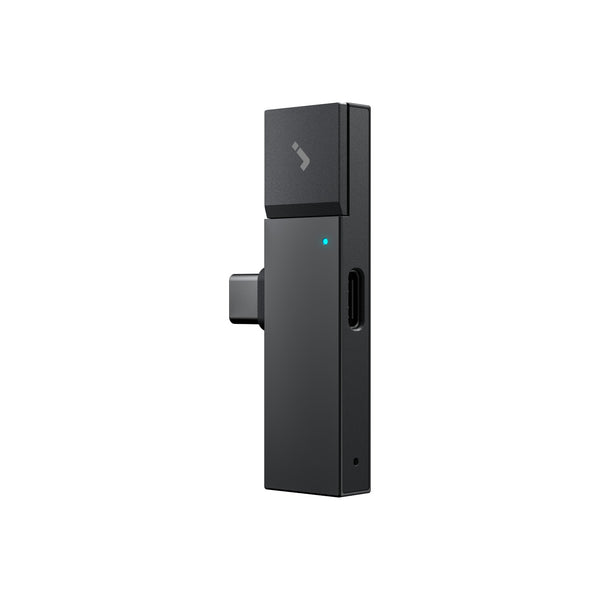
HiDock P1 mini plugs into a compatible phone through USB-C. Pair your Bluetooth earphones in HiNotes and use BlueCatch™ to capture a supported client call while you listen through your earphones. The compact setup shown in the images suits discovery calls between appointments as well as at your desk.
The listed price is US$119, with 32GB of local storage. P1 mini offers two recording modes: Call Mode for supported calls with Bluetooth earphones and Room Mode for in-person conversations.
After the call, transfer the recording to HiNotes, generate a transcript and summary, and review the source material before drafting your findings. The phone screenshots below show that progression from the call audio route to the HiNotes review screens.
What is included with HiNotes?
The free Member plan includes unlimited core transcription, basic summaries, and TXT export. Speaker identification, custom templates, and additional export formats are paid features. You can still organize a transcript into a discovery framework manually on the free plan.
HiNotes lists Pro quota options at US$12.99 for 1,200 minutes and US$99.99 for 12,000 minutes, plus an Unlimited plan at US$199 per year. These paid options add advanced functionality; basic transcription is already unlimited for HiDock users. See the HiNotes plan comparison for the current feature breakdown.
Prices and plan details checked September 24, 2026; they may change.

From discovery call to deliverable: a six-step workflow
- Prepare P1 mini. Agree on recording and AI processing. Connect P1 mini to your compatible phone, pair your Bluetooth earphones through HiNotes, and test Call Mode before the client joins.
- Capture the discovery call. Start recording with P1 mini and focus on the client. Use brief written notes for follow-up questions and decisions, rather than trying to type every sentence.
- Review the transcript in HiNotes. Transfer the P1 mini recording and generate a transcript and summary, as shown in the screenshots. Check names, numbers, dates, and technical terms against the audio. If your plan includes speaker identification, verify the labels too.
- Organize the findings. Group relevant material under the problem, supporting evidence, business impact, constraints, and open questions. Use a summary as a starting point and check it against the source.
- Build the recommendation. Explain what you propose, why the evidence supports it, and what needs validation. Use direct quotes only after checking their wording and context.
- Define the next step. Give each agreed action an owner and a target date. Label proposed actions clearly so the document does not turn a suggestion into a commitment.
A reusable findings template
- For each finding, fill in these six fields:
- Problem: What is happening, and who is affected?
- Evidence: Which verified quote, example, or metric supports it?
- Impact: What does it mean for the client's work or goals?
- Recommendation: What should happen next, and why?
- Validation needed: Which assumptions or missing details remain?
- Action: Who owns the next step, and when will it happen?
Illustrative example: A client describes repeated approval delays. Your finding identifies the unclear handoff, cites a verified example from the call, and proposes testing a named approver and response deadline. Before presenting the recommendation as agreed, confirm the owner and timeline with the client.
- Capture the call with agreed consent.
- Transfer and verify the transcript in HiNotes.
- Organize evidence, constraints, and open questions.
- Draft the findings brief and recommendation.
- Confirm the brief, owner, and next step with the client.
Your judgment turns the transcript into value
A transcript is working material. It can contain errors, and even a perfectly transcribed conversation does not establish that every statement is correct. Check important claims, compare stakeholder perspectives, and distinguish evidence from interpretation.
Your contribution is deciding which findings matter, what they mean, and which recommendations the client can act on. A clear record supports that work; it does not perform the analysis for you.
Build trust through accurate follow-through
Clients notice when you remember their priorities, quote them accurately, and follow up on the questions that remained open. A repeatable workflow helps you do that consistently: agree on capture, verify the evidence, and deliver a clear recommendation.
Frequently asked questions
Should I tell the client I am recording?
Yes. Explain your intended recording and transcription workflow before you start and obtain the necessary agreement. A hardware recorder does not add a bot participant, so do not rely on the meeting interface to communicate your plans.
How does this differ from a bot notetaker?
A meeting bot joins the call as a participant. HiDock P1 mini captures supported call audio through its USB-C and BlueCatch setup. That changes how audio is captured, but client policies and data-handling requirements still apply.
Can P1 mini record phone calls and in-person conversations?
Yes. Use Call Mode for supported phone calls and Room Mode for in-person conversations. P1 mini also supports compatible USB-C computer setups. Check device compatibility and make a test recording before an important conversation.
What if the client does not want to be recorded?
Do not record. Take focused notes, confirm key points during the call, and send a written recap for review.
Can I quote directly from an AI transcript?
Check every direct quote against the recording first. Confirm the speaker, exact wording, and context, especially when a quote supports a recommendation.
Does permission to record cover AI transcription?
Do not assume it does. Discuss the transcription service and planned data handling separately, and confirm they meet the client's requirements before uploading the recording.
Make the next discovery call easier to act on
A strong discovery deliverable carries the client's priorities into a clear recommendation. Start with an agreed capture method, check the details, and make every finding traceable to evidence. Then use your judgment to turn that evidence into the next useful step.
Bring the workflow together with HiDock P1 mini: capture the agreed client conversation, review it in HiNotes, and turn the details into a deliverable your client can act on.